
Changing Your Password
Purpose
This article explains the two ways you can change or reset your 1st Reporting password: from the login screen or while logged in to the application.
Method 1: Reset Your Password from the Login Screen
Use this method if you have forgotten your current password or are unable to log in.
Step 1: Open the Login Screen
- Go to the 1st Reporting login page.
- Click Forgot Password?
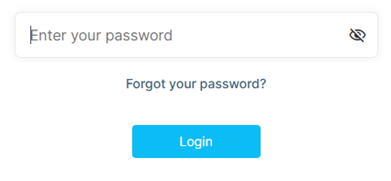
Step 2: Request a Password Reset
- Enter the email address associated with your account.
- Submit the request.
- You will receive an email notification with instructions to reset your password.
Step 3: Reset Your Password
- Open the password reset email.
- Follow the instructions provided.
- Enter and confirm your new password.
Method 2: Change Your Password While Logged In
Use this method if you know your current password and are already logged in to the application.
Step 1: Open Your Profile
- Click your name in the upper-right corner of the application.
- Select Change Password.
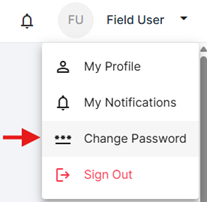
Step 2: Enter Your Password Information
- Enter your current password.
- Enter your new password.
- Confirm your new password.
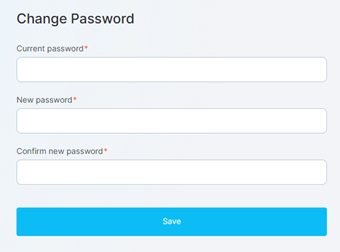
Step 3: Save Your Changes
- Review your password information.
- Confirm your changes.
Your password will be updated and can be used the next time you log in.
Frequently Asked Questions
What should I do if I forgot my password?
From the login screen, click Forgot Password? and follow the instructions sent to your email.
Can I change my password while logged in?
Yes. Click your name in the upper-right corner, select Change Password, enter your current and new passwords, and confirm your changes.
Will I receive an email when changing my password from within the application?
No email is required when changing your password from within the application. The password can be changed directly from the Change Password option in your profile.
Vous avez encore besoin d'aide ?
Vous ne trouvez pas ce qu'il vous faut ? Appelez-nous ou ouvrez un ticket et notre équipe vous répondra.
+1 (833) 231-6212 · Mon–Fri, 9 AM – 5 PM (Eastern Time)