
Updating Account Branding
Purpose
This article explains how to update your organization's branding by uploading a company logo and application icon.
Prerequisites
- You must be the Account Creator to access and modify Account Details.
Browser Instructions
Step 1: Open Account Details
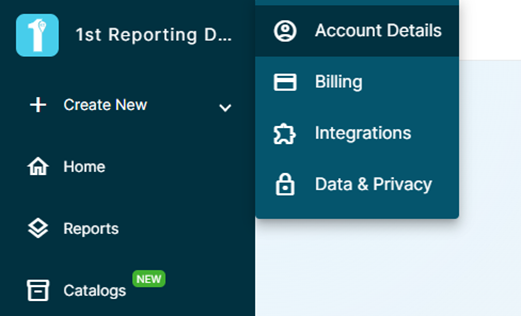
- In the upper-left corner of the application, click the Account Name.
- Select Account Details.
Step 2: Open the Branding Section
- Locate the Branding section.
- Click the Edit button on the right side of the section.
Step 3: Upload Branding Images
- Upload an Icon for the application.
- Upload a Company Logo.
Step 4: Save Your Changes
- Review the uploaded images.
- Save your changes.
Mobile Instructions
Step 1: Open Account Details
- Open the side navigation panel.
- Tap Settings.
- Tap Account Details.
Step 2: Open the Branding Section
- Locate the Branding section.
- Tap the Edit button on the right side of the section.
Step 3: Upload Branding Images
- Upload an Icon for the application.
- Upload a Company Logo.
Step 4: Save Your Changes
- Review the uploaded images.
- Save your changes.
Important Notes
Account Access
Only the Account Creator can access the Account Details page and modify account branding settings.
Company Logo Usage
The Company Logo can be used throughout the platform on templates, reports, notifications, and other customer-facing communications.
Application Icon Usage
The Icon is used to brand the application itself.
Frequently Asked Questions
Why can't I access Account Details?
Only the Account Creator has permission to access and modify Account Details.
What is the difference between the Logo and the Icon?
The Company Logo is typically displayed on templates, reports, and notifications, while the Icon is used to brand the application interface.
When will my branding changes appear?
Branding changes are typically applied immediately after they are saved, though some users may need to refresh the application to see the updated branding.
Can I update the branding later?
Yes. The branding settings can be updated at any time by the Account Creator.
¿Todavía necesita ayuda?
¿No encuentra lo que necesita? Llámenos o abra un ticket de soporte y nuestro equipo le responderá.
+1 (833) 231-6212 · Mon–Fri, 9 AM – 5 PM (Eastern Time)