
Keeping a police precinct running isn’t for the faint of heart. Numerous situations might arise where forms and paperwork start to pile up. Using standardized forms for things like a ride-along request is essential – so you don’t get lost in a sea of paperwork.
A ride along request form is used when a public member wants to accompany an officer during their shift. You’ll easily manage paperwork, and citizen requests with a standardized form solution.
This guide will review our Ride Along Request Form, including the intended use. Further to that point, we’ll talk about a few things you can use in your division to help streamline paperwork, making it easier to do the other aspects of your job. Let’s get started with the form and what’s included.
Key Takeaways
- Form Composition: The Ride-Along Request Form is divided into two distinct sections: one for the citizen’s personal information and request details, and a second for internal office use and background checks.
- Implementation Steps: To launch a successful program, download the 1st Reporting app to customize your form, designate a Program Coordinator, and ensure a clear approval process is in place.
- Program Benefits: An efficient ride-along program offers transparency that improves public perception while providing vital real-world field experience for potential recruits.
- Management Tips: Departments can reduce administrative bottlenecks by prioritizing document organization, enabling stakeholder collaboration, and regularly updating procedures to match new technologies.
- Digital Solutions: Utilizing a cloud-based digital solution like 1st Reporting streamlines the entire process through mobile accessibility, GPS integration, and automated notifications for supervisors.
Included in the Ride-Along Request Form
You can find 1st Reporting on Google Play or The Apple App Store.
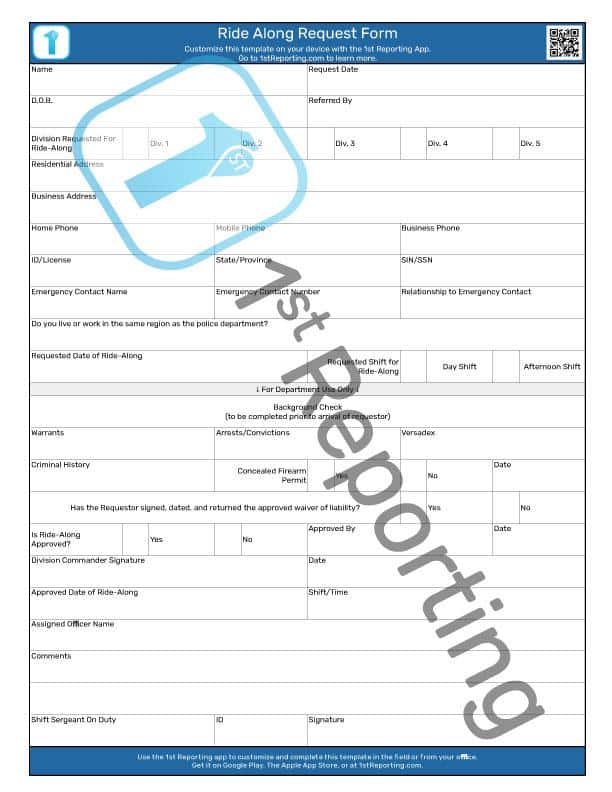
Two primary sections compose the Ride Along Request Form. These two sections include a public request form portion where citizens can have their personal information and the date of their requested ride-along.
The second half of the ride-along form template is for office use within your division. The standard background check fields and a confirmation of the waiver you will need the individual to sign are included.
How To Use The Ride-Along Request Form
Maintaining a positive image in local communities is critical to the policing service’s public relations. Furthermore, it is equally essential to ensure that up-and-coming recruits gain exposure to real-world policing scenarios. For these reasons, the Ride-Along Program is a critical feature in many police departments.
If you’re just starting your ride-along program, you’ll need a means of documenting ride-along requests. Furthermore, due to the sensitive nature of policing, those who participate in the program will require the appropriate background checks completed before acceptance to the program.
Utilizing our Ride-Along Request Form for such a purpose is the intent behind why we made the form. Moreover, we’ve combined the form’s public and confidential aspects into a single report, so your division won’t be buried in paperwork from such a simple request.
For best results, we recommend the following procedure for ride along request form submission.
- Download the 1st Reporting app.
- Customize the Ride Along Request Form in-app. Bookmark this page, so you can quickly come back to it should you need a quick reference.
- Invite your fellow officers to 1st Reporting.
- Designate a Ride-Along Program Coordinator. This individual will take ownership of the program and coordinate ride-along with citizen requestors, dispatch, and scheduling.
- Provide all administrative staff with guidance as to documentation procedures, including how background checks are completed and reviewed. Ensure that all stakeholders know how the documentation works, where it is maintained, and by whom.
- Ensure that a process exists for final program approvals, whether a section chief or other responsible party has the final authority to approve or disapprove a program application.
That’s it, in a nutshell. It’s not an intricate system to implement, and the benefits to the community are numerous. Here are a few of those benefits explained in more detail. But before we jump in, if you are also managing private details, refer to The Ultimate Guide to Digital Reporting.
Benefits of an Efficient Ride Along Request Form and Program
There are several benefits for a police precinct to host a Ride-Along Program and organize it using a ride along request form management system like that of 1st Reporting.
Public Perception – Probably the most essential benefit to both the police and their community is the ride-along program’s ability to let the public ‘walk a mile’ in the officer’s shoes.
Public perception of police services has fallen off a cliff over the last few years, and the exacerbated behavior of a few bad officers has tarnished the entire concept of policing, probably for the next decade. However, proper utilization of a ride-along program can dramatically improve the community’s perception of police services.
Real-World Experience – The second best thing about an efficient ride-along program is the experience it provides for cadets and others interested in pursuing a career in law enforcement. There is no better way for a cadet to learn what being an officer of the law means than to ride along with real officers on their actual day-to-day patrols. After all, it’s not like television portrays police officers as anything like what the real world looks like.
Tips For Better Report, Checklist, and Ride Along Request Form Management

We’ve covered the basics of the ride-along program concept and how to use the digital form, and we’ve discussed some of the benefits of a robust ride-along program – for both your precinct and the community at large. But how can we improve processes like this? How can we dial down the paperwork that piles up on every desk, seemingly without end?
We’ve got some ideas, and we’d like to share the top four ways we have found that have benefitted law enforcement agencies and helped dial down the paperwork (on everyone’s desk).
Organization, Accessibility, and Collaboration with the Ride Along Request Form
The sheer volume of paperwork flowing through police departments means that they need to be on top of their game, administratively speaking. So, it isn’t a big surprise that our first tip involves using every means necessary to organize paperwork and documentation at your precinct. That includes using a digital ride along request form.
Documents need organization, proper access for the correct people, and a platform where all key stakeholders can access and collaborate as needed. The world of paper forms is ending, and the endless bureaucracy of paperwork seems to grow larger every day. So, it would be best to consider streamlining processes, even if that means introducing procedural checklists to ensure everyone is on the same page with your standardization and efficiency program.
Update, Review, Update
When you have a system that works, that’s a great feeling. However, a lot of the time, we have to amend our procedures to keep up with societal changes. For example, when rolling steel and powered doors came into existence, then booking procedures changed as precincts adopted drive-thru holding and booking practices.
Now we could drive right into a secured building area, shut the door, and the sealed area is now a transfer point from cruiser to cell. Technology and the way we brought perpetrators into our stations changed. So we must update and review our documentation and reporting practices as time, society, and technology change.
Streamline Support Processes
All this talk of streamlining processes, organizing documentation, and reviewing and updating methodologies has a singular purpose: to make your job easier. Now, we can’t do anything about your officer’s job out on the street, but we most certainly can provide support to help you streamline your support and documentation processes.
Considering all form requirements, reports, and other documentation, it’s best to try to automate and streamline as many of these processes as possible. As our world grows ever more complex, so will our need to document, report, and manage it. The only way to consider staying relevant is by learning to streamline processes further. Following is probably the best way to handle the streamlining of reports and documentation.
Use Digital Reporting Solutions for Ride Along Request Form Completion
If your police precinct is still using only paper reports and forms, then it’s time for you to upgrade your precinct’s documentation practices. Luckily, we’ve got a solution for you and your division.
Most police divisions and precincts utilize some form or another of digital reporting these days. However, many existing solutions don’t offer the variety of benefits of a secure mobile platform like 1st Reporting offers. Officers are tied down to their desks or vehicles to complete reports. And that, my friend, is a bottleneck to reporting efficiency.
Take a moment to consider your alternatives. Let’s use our app, 1st Reporting, as an example of what your precinct could be doing instead to make all of your lives easier. Especially for standard paperwork like the ride along request form.
1st Reporting is an industry-leading secure, cloud-based solution for creating forms, checklists, and other documents, completing them in the field, and reviewing/managing results. The application provides dynamic custom report building, reports linking for streamlined report experiences, GPS integration, and a powerful management dashboard with customizable map views and generative reports.
It’s the mobile solution to form completion and management. It makes managing the ride along request form and other documents easy and efficient. It’s easy to use and works on nearly any device, including desktops, laptops, Android, and iOS devices (smartphones and tablets). Our app even works within the Microsoft Teams® environment so that you can receive notifications right on your Teams® dashboard.
Did I just say notifications? That’s right, you can easily set up customized automatic notifications within the app, so your officers can complete a report, and you can ensure the proper sergeant or supervisor gets a message – right on their phone.
Imagine setting up notifications so that anytime your officers complete a use of force report, draw their weapon, or complete an arrest, you could have a custom notification sent to the appropriate party. It’s a simple way to automate basic communications and ensure no one misses something essential again.