
Exporting Users to Excel
Purpose
This article explains how to export your organization's user information to an Excel spreadsheet.
Prerequisites
- You must have System Administrator permissions.
Browser Instructions
Step 1: Navigate to Users
- Open the web application.
- Navigate to Team → Users.

Step 2: Open the User Options
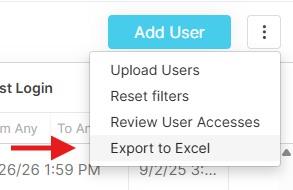
- Click the three dots (⋮) in the upper-right corner of the Users page.
- Select Export to Excel.
Step 3: Download the Export
The user information will be exported to an Excel spreadsheet and downloaded to your computer.
Frequently Asked Questions
Who can export users to Excel?
Only System Administrators can export user information.
Where is the exported file saved?
The Excel spreadsheet will be downloaded to your computer through your browser's normal download process.
Ainda precisa de ajuda?
Não encontrou o que precisa? Ligue para nós ou abra um chamado e nossa equipe retorna o contato.
+1 (833) 231-6212 · Mon–Fri, 9 AM – 5 PM (Eastern Time)