
Campus security technology is essential in today’s colleges, universities, and educational institutions. Sure, we’ve all seen those security posts with panic buttons to alert security, and we’re all aware of radio and smartphone communications. But what you may not be aware of is the new software technologies that make security incident reporting more advanced, accessible, efficient, and effective.
The growing adoption of security measures across institutions is posing challenges for campus safety and security. However, no one is looking at how we can empower existing security teams to complete complex reports more easily and efficiently, adding media like photos, video, and audio to their reports, making the prosecution of campus offenders easier and more effective.
In this guide, we’ll explore one of the most powerful software technologies of the century, empowering security professionals worldwide with advanced field reporting capabilities right from their smartphones. Welcome to 25th-century incident reporting with the 1st Reporting app and exponentially faster response to campus security issues.
The Evolving Landscape of Campus Security Technology and Reporting
Today’s institutions face a variety of challenges, from campus protests to late-night post-pub crawl antics. As times have changed, so have our fears for security, despite changes in technology. Please take a look at the data I compiled from an ongoing Gallup survey below. As you can see, perceptions of security risks declined overall between the late 90s and 2009. A small gap in available data, and we can see the next decade’s data from 2012 to 2023 (again, a small gap in available data between 2020 and 2021) trending upward.
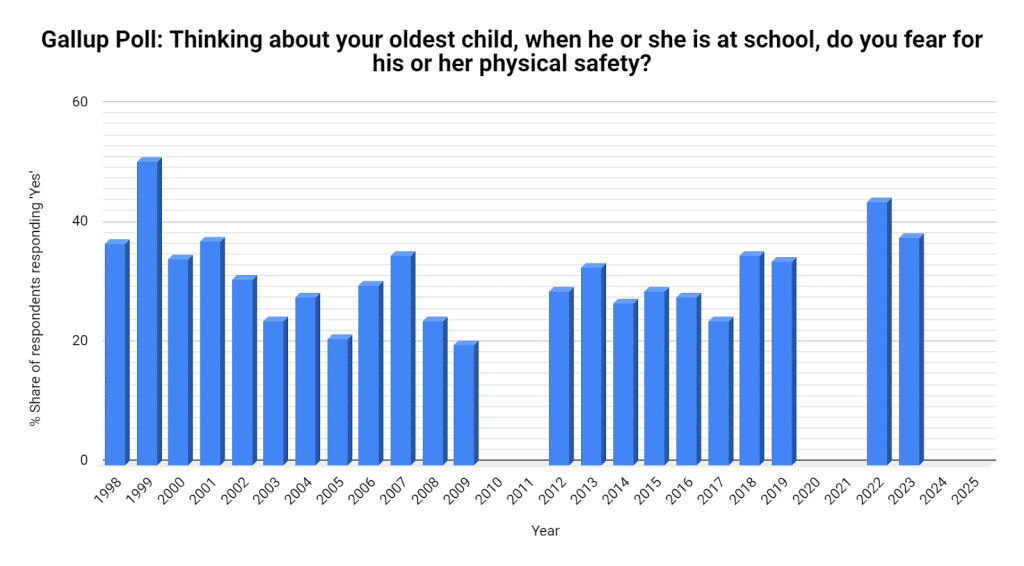
Source: 1. Gallup Poll; see reference list at the end of the article for complete source information.
The data from the above survey indicate that our feelings about the safety of our children in the school system (in the USA) are about the same as they were in 1998. Despite all the advancements in technology, our perception of the safety of our children within the school system has fluctuated but remains about the same as it was 20 years ago.
With improved technology, school safety would also improve.
Many of today’s post-secondary institutions have robust systems in place, such as those panic button safety posts I mentioned at the beginning of the article. However, there remains a bottleneck in many institutional security systems, stemming from the need to complete paperwork, collect evidence, and report expeditiously.
To overcome the challenges of reporting and documenting security concerns and incidents, institutions must prioritize tech-based security solutions that go beyond mere hardware. Today, we can overcome the paperwork bottleneck with software solutions that simplify security reporting. To understand the relevance, let’s look at the top three most widespread and practical security technologies reshaping the security landscape.
While hardware is vital, the security industry is moving toward comprehensive digital reporting to manage it all.
Key Campus Security Technologies for Educational Institutions
My research identifies three primary groups of technologies fundamental to campus security: surveillance, access control, and software. I say software because, with everyone carrying a smartphone, software security technologies are advancing faster than the hardware that runs them.
Surveillance Systems and Smart Cameras
Real-time surveillance in public areas around campus is the first thing that comes to mind when I think of educational institutional security. However, even in known high-risk regions, public elementary schools must use some form of surveillance. I’m not saying a kid is going to bring a gun to school, even though that happens, but for the safety of younger kids from predators who think they can snatch a kid from a school playground, and other such horrors.
New software technologies coupled with surveillance are creating smart cameras. Some of these systems can run facial recognition, motion and movement tracking, and real-time notifications to help security teams maintain real-time safety through surveillance. (2)
Try the 1st Reporting Application for Security Professionals
Access Control Systems
Facilities that house sensitive data or equipment typically use card-swipe and similar access-control technologies. In educational institutional settings, these control systems are usually found only in dormitories or highly sensitive laboratories with sophisticated, expensive, or dangerous equipment.
Today’s access controls use advanced technologies like keyless entry, smart cards, and even biometric scanners for those places that want to feel like Nick Fury or 007. These technologies can use anything from a fingerprint scanner to facial recognition, or even an iris or retinal scanner, to verify a person’s identity. (3)
Incident Reporting and Response Software
Depending on the hardware your security system uses, you may be limited to software that works exclusively with surveillance equipment, alarm or panic systems, or lighting system controls. However, one aspect of security that often lags behind hardware advancements is the reporting and documentation of incidents and incident response.
We’re proud to have built 1st Reporting, a software application that leads the way in mobile security incident documentation. The team at 1st Reporting saw a need for security personnel to have a mobile reporting system to document incidents and events using the smartphones they already carry. Sure, radios are still great for reporting to the base, but when an event occurs, a report is still a primary requirement.
1st Reporting is a mobile application that is multi-platform compatible, easy to use, and secure. It empowers security personnel to complete incident or accident reports, daily activity reports, patrol logs, and maintenance reports if they observe property damage. The application is GPS-enabled, has a powerful form and notification customizer, and even utilizes Artificial Intelligence to help you build forms for any need, from security to building maintenance.
Let’s look at the role of mobile-enabled incident reporting next and see how solutions like 1st Reporting are making such a noticeable difference in effectiveness, response time, and reporting efficiency.
Read More Security-Related Case Studies and Posts
- The Security Shift Report (Digital Template for Mobile Reporting)
- Using Digital Forms In Policing and Security
- Managing Background Check Consent For Security Firms
- Security Incident Reporting Essentials
Role of Mobile-Enabled Incident Reporting in Campus Security
Mobile incident reporting by security personnel on educational institution grounds is a primary component of today’s robust security teams. The advantage of mobility in security reporting is apparent—teams that can report incidents on the go save time, collect better data and evidence, and provide a more prosecutable solution.
Users of 1st Reporting note that the mobile application enables security teams to collect evidence—photos or videos — right on their mobile devices, whether or not they have a data signal. Even when the security personnel are out of smartphone range, such as in an underground parking garage, the application stores inputs locally on the device until it can once again connect to the cloud. This secure data process ensures that no matter the signal, security can always complete their reports in the field, wherever they are.
Real-Time Data Access for Security Teams
Using a tool like the 1st Reporting application, security teams and managers can access reports in real-time. So, a security team in the field could complete a report, and within seconds, a team manager could review its data, even though they were in different locations. Distance means very little when data is stored on a secure cloud server (1st Reporting is ISO-certified).
Customizable Forms for Campus-Specific Needs
Every campus is different, with different buildings, layouts, and needs. This is where a customizable solution like the 1st Reporting application shines. The application’s customizable forms empower teams like yours to use site-specific forms to solve the most custom security scenarios.
Dynamic Linking for Follow-Up Actions
Another powerful feature of software applications like 1st Reporting is the ability to dynamically link reports so managers like you can track entire workflows—from incident to victim follow-up to property damage repairs. Using the application’s custom form and notification builder, you can create customized security incident reports and include any follow-up reports needed, added dynamically based on the initial report’s input.
You may have guessed that collaborative report review is easy due to secure cloud storage. You would be correct in that assumption, but let’s look at how emergency response is positively affected.
Emergency Response and Notification Systems
Automated Alerts and Notifications
I mentioned how you can customize forms and notifications within the 1st Reporting application. However, to fully grasp how the system can empower you and your security team, we need to dive a little deeper.
The custom notification system in the 1st Reporting application lets you create email-based notifications (or Microsoft Teams-based notifications if you’ve set it up). When I say custom notifications, what I mean is that you control the following:
- Notification recipient(s)
- Notification message
- What triggers the notification? You decide.
- What conditions must be met for the trigger to work? Again, you decide.
The notification is simple, effective, and extremely powerful thanks to its high level of customization. Just think how quickly security management can now make decisions about security incidents in near real-time due to the collaborative features of 1st Reporting, coupled with the powerful notification system. The impact of reducing response time and increasing situational awareness is exponentially improved.
Securing Your Educational Institution: Final Thoughts
In today’s rapidly evolving security landscape, educational institutions must adopt a proactive approach by leveraging cutting-edge technology. By integrating advanced surveillance systems, access control, and mobile-enabled incident reporting, schools can significantly enhance safety, streamline response times, and ensure accountability across the board. The key is to invest in comprehensive solutions that not only address current challenges but also anticipate future threats.
As technology continues to advance, so too must our security strategies. Staying ahead of potential risks requires ongoing adaptation, investment, and a commitment to the safety of students, staff, and campus visitors. The future of campus security depends on our willingness to embrace these innovations and create safer, more secure educational environments.
Article Sources
- Jones, Jeffrey M. 2023. Gallup.com. Gallup. August 31, 2023. https://news.gallup.com/poll/510398/school-parent-safety-concerns-remain-high.aspx.
- “Security Technology Trends in the Surveillance Industry 2024.” 2024. Spotter Security. August 6, 2024. https://www.spottersecurity.com/blog/security-technology-trends/#:~:text=AI%2DDriven%20Video%20Analytics,between%20different%20types%20of%20activities..
- “Biometric Security – Definition, FAQs – Innovatrics.” 2023. Innovatrics. 2023. https://www.innovatrics.com/glossary/biometric-security/#:~:text=Biometric%20security%20is%20a%20modern,to%20verify%20a%20person’s%20identity..